Guide
How to send a video to a client for approval
Export a review copy, upload it somewhere that gives you one private link, and send that link with a deadline and a clear ask. Your client leaves each note on the exact frame. You fix the notes in a new version, they compare it with the last one and approve on the page, and you file the approved master.
Before you send anything
Most approval problems start before the client presses play. Decide three things first, and put them in writing.
- Who approves. One person signs off. Everyone else can watch and comment, but one name says yes.
- What kind of notes you want. On a first cut you want story and pacing notes. On a final you want fixes, not a new idea.
- How many rounds are included. Write the number in the quote, not only in an email.
Step by step
- Export a review copy. Not the master. A smaller file plays faster on a phone and on hotel wifi, and the client is judging the edit, not the bitrate. Name it with the version, for example v1, so nobody has to ask which one is new.
- Upload it and get one link. Use a place that plays the video in the browser, keeps it private, and lets the client comment without making an account. Every account you ask a client to create is one more reason for them to reply by email instead.
- Send the link with a deadline. Say what you need, by when, and what happens next. A short message works better than a long one. There is one you can copy below.
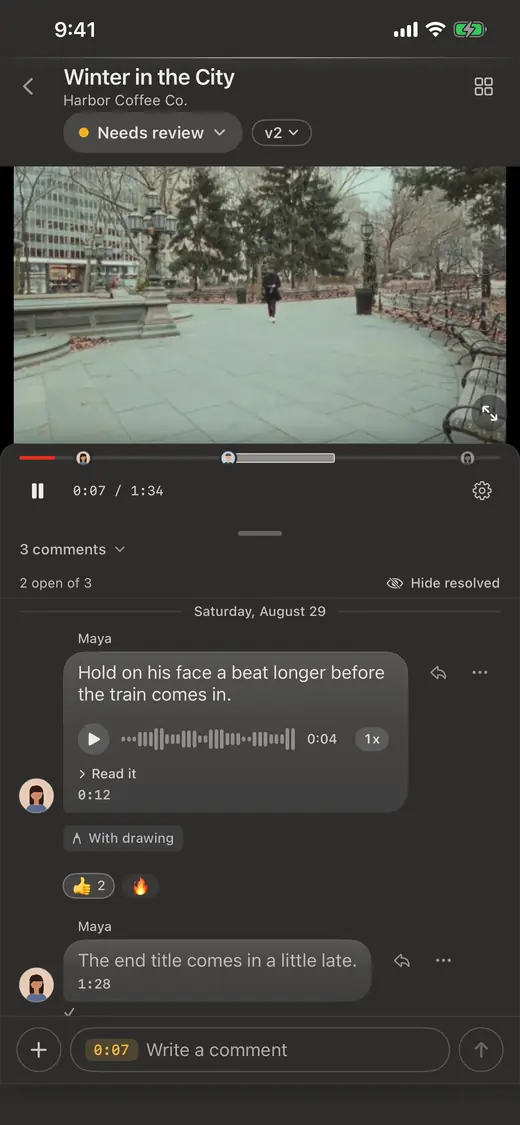
- Get notes on the frame. Ask for every note to be left on the moment it is about. "At around two minutes" sends you hunting. A note pinned to the frame, with a circle drawn on the thing that bothers them, does not.
- Make the changes as a new version. Upload v2 to the same link instead of sending a new one. The notes from v1 stay with the job, so you can check each one off.
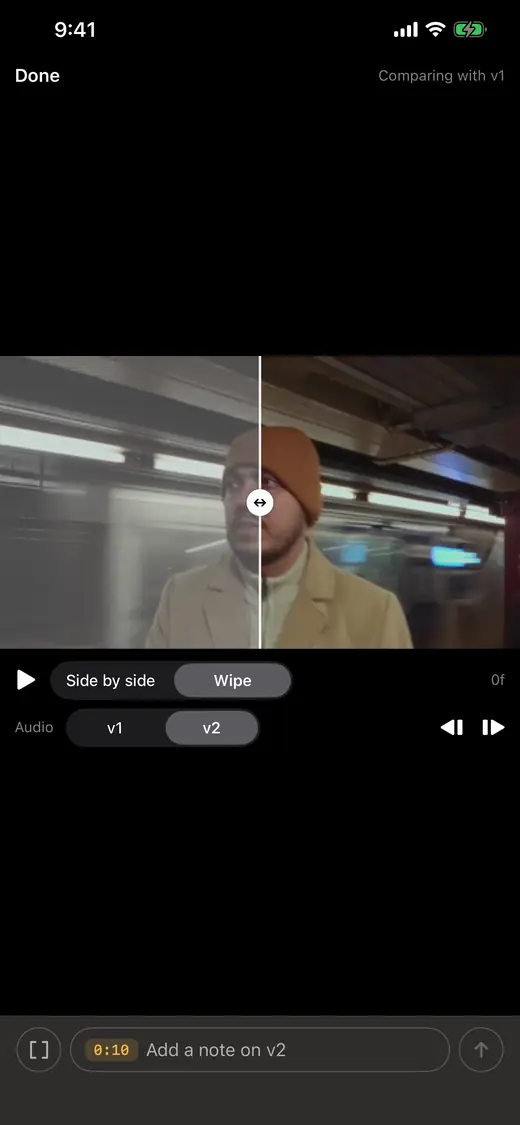
- Let the client compare and approve. Put v1 next to v2 so they can see that each note was fixed. Then ask for the approval on the same page, as a clear yes, not a thumbs up in a text thread.
- Archive the approved file where you keep your work. File the approved master in your own storage, in that client's folder, the day it is approved. Months later, when they ask for the file again, you will know where it is. Better still, let the approval do it: in Proofbin the approved cut is copied to the client's folder on your Google Drive on its own, so nobody downloads it and uploads it again by hand.
A message you can send with the link
Change the names and dates. Keep it this short.
Revision rules you can put in your quote
Clear rules are not about being strict. They stop a project from drifting, and they make the second round better because the first round was complete.
What to avoid
- Email attachments. Large files bounce, small ones look bad, and the next version starts a new thread.
- Notes by time code typed by hand. "1:52, the logo" is often off by a few seconds, and you end up guessing which shot they meant.
- Feedback in four places. A text from the client, an email from their boss and a voice memo from the marketing person all describe the same cut differently. Ask for every note in one place.
- A new link for every version. The client opens the old one by mistake and you get notes on v1 while you are working on v3.
- Approval by silence. "No reply means approved" causes arguments later. Ask for a clear yes.
How we run it in Proofbin
We built Proofbin around this exact process, because it is how we run our own client work. Your client opens one link, with no account and no password, and leaves each note on the exact frame. They can type it, draw on the frame or record a voice note. Your next version goes into the same link, and v2 plays side by side with v1, or with a wipe over the same frame, with the earlier notes alongside. The client approves without leaving the page.
Then the approved cut moves on by itself. Proofbin copies it to the Google Drive folder you picked for that client, at the size you delivered it, by the next morning. A client can also connect their own Google Drive or Notion from their link. No downloading and uploading by hand, and it works during the free trial too.
Questions
Does my client need an account to leave feedback?
They should not. Pick a tool where the client opens a link and comments right away. In Proofbin the client needs no account and no password, and clients never count toward your bill.
How many revision rounds should I include?
Two rounds is a common place to start for a short video. What matters more than the number is defining a round: one complete set of notes on one version, sent together by the person who approves.
What file should I send for review?
A review copy, not the master. A smaller file starts faster on a phone, and the client is judging the edit. Send the full quality master once the cut is approved.
What if my client keeps sending notes by text or email?
Reply with the link and ask them to leave the note on the frame it is about. After the first time most clients stay there, because it is easier for them too: they point at the thing instead of describing it.
How do I get a clear approval?
Ask for it on the same page as the video, from the person named as the approver. In Proofbin the client taps Approve on the cut, so the approval sits on the cut itself, not in a text thread.
Put one job through it.
Take a job you already have, upload the cut and send the link. The 14-day free trial is enough to run that test, and it needs no card.